Primary links

  • Home
  • AI
  • Kubernetes
  • Incus
  • Ansible
  • Terraform
  • OpenStack
  • Virtualization
  • Linux
  • SmartHome
  • HowTo

Misc

  • Linux
  • Hardware
  • Programming
  • Databases
  • Multimedia
  • Windows

Cloud

  • OpenStack
  • cloud-config
  • nextcloud

Virtualization

  • Virtualization
  • Incus
  • Docker
  • KVM
  • Kubernetes
  • LXC
  • LXD
  • QEMU
  • VMware
  • VirtualBox
  • multipass
  • podman
  • vagrant
  • XEN

Network

  • DNS
  • Firewall
  • Linux
  • OpenvSwitch
  • SSL
  • VLAN
  • VPN
  • iPXE
  • namespaces
  • nmcli
  • tcpdump

Storage

  • CEPH
  • DRBD
  • LVM
  • S3
  • ZFS
  • btrfs

Automation / CI/CD

  • Install
  • Ansible
  • GitLab
  • LLM
  • Preseed
  • Puppet
  • Terraform
  • Ubuntu autoinstall

Monitoring / Visualisation

  • Grafana
  • Icinga
  • Prometheus
  • Monitoring
  • ELK
  • mermaid

HowTo

http://www.panticz.de/find
http://www.panticz.de/rsync
http://www.panticz.de/sed
http://www.panticz.de/ssh
http://www.panticz.de/ip
http://www.panticz.de/apt
http://www.panticz.de/hardware

[embed_url: https://raw.githubusercontent.com/panticz/scripts/master/howto.sh]

Sync Time

synchronizing system time with Ubuntu servers

sudo ntpdate ntp.ubuntu.com
ntpdate -b ntp.ubuntu.com

setting hardware clock to new time

sudo hwclock --systohc

create cron job

sudo wget -q http://dl.panticz.de/scripts/syncTime.sh -O /etc/cron.daily/ntpdate
sudo chmod 755 /etc/cron.daily/ntpdate

Links
https://help.ubuntu.com/10.04/serverguide/C/NTP.html

Ubuntu 23.04 Lunar

Release schedule
https://discourse.ubuntu.com/t/lunar-lobster-release-schedule/

Release notes / Known issues
https://discourse.ubuntu.com/t/lunar-lobster-release-notes/

Download
Releases: http://releases.ubuntu.com/23.04/
Legacy Desktop Installer: https://cdimage.ubuntu.com/releases/lunar/release/ubuntu-23.04-desktop-legacy-amd64.iso
Cloud image (minimal): https://cloud-images.ubuntu.com/daily/server/minimal/daily/lunar/current/lunar-minimal-cloudimg-amd64.img

Repository

echo "deb http://de.archive.ubuntu.com/ubuntu lunar main restricted universe multiverse" | \
    sudo tee /etc/apt/sources.list.d/ubuntu-lunar.list
echo "deb http://de.archive.ubuntu.com/ubuntu lunar-updates main restricted universe multiverse" | \
    sudo tee /etc/apt/sources.list.d/ubuntu-lunar-updates.list

Known issues / workarounds

# Disable application search
gsettings set org.gnome.desktop.search-providers disable-external true

# ZFS on Ubuntu 23.04
https://github.com/Sithuk/ubuntu-server-zfsbootmenu

# NetworkManager "Automatically connect with VPN" nested VPN issue
https://gitlab.freedesktop.org/NetworkManager/NetworkManager/-/issues/610#note_1805201

Schedule
https://discourse.ubuntu.com/t/lunar-lobster-release-schedule/

Hardware

Notebooks
http://thinkwiki.de/
http://en.wikipedia.org/wiki/HP_EliteBook

Memtest
# bootable floppy image
https://www.memtest86.com/downloads/memtest86-4.3.7-floppy.img.zip

USB_PEN=/dev/sdc
URL=https://www.memtest.org/download/v6.00b1/mt86plus_6.00b1_64.iso.zip 
wget -q ${URL} -P /tmp/
unzip  /tmp/mt86plus_6.00b1_64.grub.iso.zip -d /tmp/
dd if=/tmp/mt86plus_64.iso of=${USB_PEN}

Test tools
http://code.google.com/p/inxi/ - a full featured system information script
http://www.advancedclustering.com/software/breakin.html - Breakin
http://www.hdt-project.org/ - Hardware Detection Tool
http://www.stresslinux.org - stresslinux
http://ezix.org/project/wiki/HardwareLiSter - Hardware Lister (lshw)
http://www.hitachigst.com/hdd/support/download.htm?linkto=QL#DFT - Hitachi Drive Fitness Test
http://www.memtest.org/ - Memtest86+ (Advanced Memory Diagnostic Tool)
http://memtest.org/download/beta/?C=M;O=D - memtest86+ beta version
http://pyropus.ca/software/memtester - memtester (userspace utility for testing the memory
http://www.nongnu.org/dmidecode/ - get BIOS informations
http://smartmontools.sourceforge.net/ - smartmontools (monitor hdd's using the SMART system built into the hard drive)
http://www.supermicro.com/support/faqs/faq.cfm?faq=8659 - Supermicro BIOS recovery procedure
https://www.parkytowers.me.uk/thin/Linux/other.shtml - ThinClients

HylaFax faxserver under Ubuntu / Debian

Queue status

# shows fax in the queue waiting to be sent
faxstat -s

# shows faxes sent
faxstat -d

#shows faxes received
faxstat -r

# Delete fax
faxrm JOB_ID

# or if you can´t delete run as creator
sudo -u  faxrm JOB_ID

HylaFax spool directory

/var/spool/hylafax/

delete all send faxes

for i in $(ls /var/spool/hylafax/doneq); do
   faxrm ${i:1}
done

get rejected fax nubers

faxstat -d | grep REJECT | cut -d" " -f 7 > fax_rejected.txt

delete rejected jobs

faxstat -d | grep REJECT | cut -d" " -f 1 > fax_rejected_ids.txt
for i in $(cat fax_rejected_ids.txt); do
    faxrm $i;
done

Links
http://www.linuxfocus.org/Deutsch/March2001/article196.shtml

python

Python Tutorial
https://www.w3schools.com/python/python_functions.asp

string
http://thepythonguru.com/python-strings/
https://www.tutorialspoint.com/python/string_startswith.htm

if var1 != var2:

output to file

text_file = open("/tmp/debug", "w")
text_file.write("option1: %s\n" % option1)
text_file.write("value1: %s\n" % value1)
text_file.close()

PIP 2 under Ubuntu 20.04
https://linuxize.com/post/how-to-install-pip-on-ubuntu-20.04/

#curl https://bootstrap.pypa.io/2.7/get-pip.py | sudo python2
curl https://bootstrap.pypa.io/pip/2.7/get-pip.py  | sudo python2

pyenv
http://www.panticz.de/pyenv

Ansible

- name: Install Dependencies
  apt:
    name: ['python3-pip', 'python3-setuptools', 'python3.8', 'python3.8-venv']
    state: latest
    update_cache: yes

- name: Install AWSCLI
  pip:
    name: 'awscli'
    virtualenv_python: /usr/bin/python3

pyenv
https://github.com/pyenv/pyenv-virtualenv

cat ./roles/openstack-lab-kolla/meta/requirements.yml 
---
- src: avanov.pyenv
# ansible-galaxy install avanov.pyenv

- hosts: vm1
  roles:
    - role: avanov.pyenv
      pyenv_env: "user"
      pyenv_setting_path: "~/.bashrc"
      pyenv_path: "{{ ansible_env.HOME }}/.pyenv"
      pyenv_owner: "{{ ansible_env.USER }}"
      pyenv_update_git_install: no
      pyenv_enable_autocompletion: no
      pyenv_python_versions:
        - "3.5.10"
      pyenv_global: "3.5.10"
      pyenv_virtualenvs:
        - venv_name: "3.5.10"
          py_version: "3.5.10"
      tags: osc

Manually Intall / compile python 2.7 pyenv

Welcome on panticz.de!

linux_cube

Linux

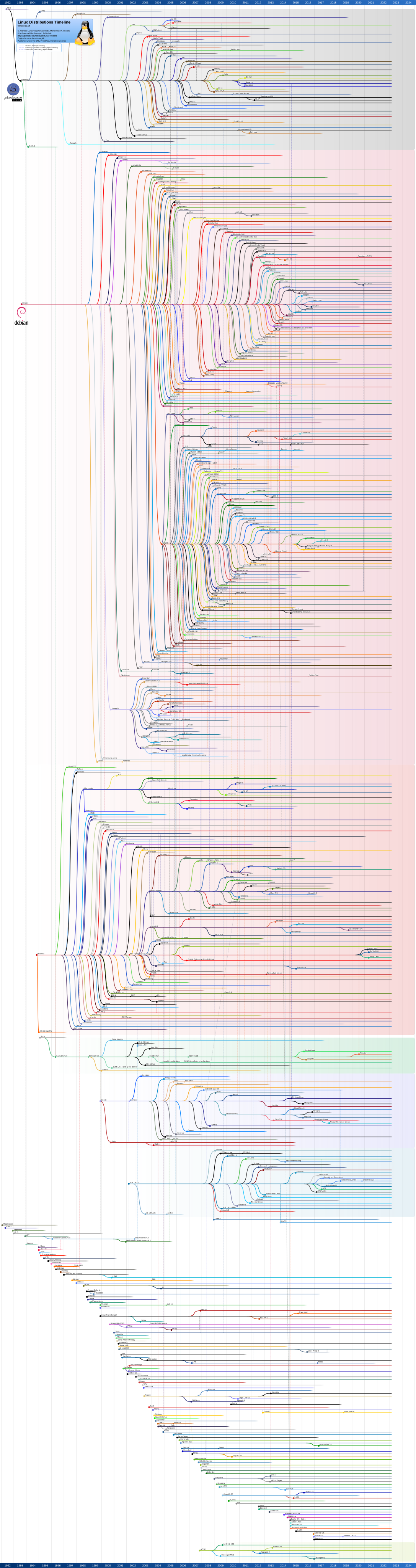
Distribution timeline
https://upload.wikimedia.org/wikipedia/commons/1/1b/Linux_Distribution_Timeline.svg

Distros
https://www.linuxliteos.com/
http://hacktolive.org/wiki/Super_OS
http://hacktolive.org/wiki/Repository

Damn Small Linux - very small Live CD
KANOTIX - Debian based LiveCD Distro
FreeNAS - The Free NAS Server
BackTrack - great distro for check net security, wep crack etc.
ENDIAN Firewall - Endian firewall community edition
Debian - Debian Installer Etch Beta 2 Download
http://www.linuxmce.org/
http://www.dd-wrt.com/ - Linux based firmware for wireless routers
http://www.opensolaris.org/ - OpenSolaris

Applications
https://www.gnu.org/software/datamash/examples/

Game
sudo apt-get install glest
http://www.playdeb.net/
http://play0ad.com/ - A. D. (Age of Empires clone)

Applications
dd_rescue - recover data from broken harddisks

Groupware
http://www.linux-magazin.de/online_artikel/uebersicht_groupware_server_teil_1

Kernel Options (from Documentation/kernel-parameters.txt)

vga=xxx - set your framebuffer resolution to VESA mode xxx. (http://en.wikipedia.org/wiki/VESA_BIOS_Extensions#Linux_video_mode_numbers)
acpi=off OR noacpi - This parameter disables the whole ACPI system. This may prove very useful, for example, if your computer does not support ACPI or if you think the ACPI implementation might cause some problems (for instance random reboots or system lockups).
acpi=force - Activates the ACPI system even if your computer BIOS date is older than 2000. This parameter overwrites acpi=off and can also be used with current hardware if the ACPI support is not activated despite apm=off.
pci=noacpi OR acpi=noirq - These parameters disable the PCI IRQ routing
pci=acpi - This parameter activates the PCI IRQ routing
acpi_irq_balance - ACPI is allowed to use PIC interrupts to minimize the common use of IRQs.
acpi_irq_nobalance - ACPI is not allowed to use PIC interrupts.
acpi=oldboot - Deactivates the ACPI system almost completely; only the components required for the boot process will be used.
acpi=ht - Impact Deactivates the ACPI system almost completely; only the components required for hyper threading will be used.
noapic - Disable the "Advanced Programmable Interrupt Controller (APIC)".
nolapic - Disable the "local APIC".
apm=off OR noapm - Disable the Advanced Power Management.
irqpoll - Changes the way the kernel handles interrupt calls (set it to polling). Can be useful in case of hardware interrupt issues.

openSuSE
http://www.suse.de/~ug/autoyast_doc/invoking_autoinst.html - Autoyast

XEN

Links
http://wiki.univention.de/index.php?title=Installing-signed-GPLPV-drivers - Installing-signed-GPLPV-drivers
http://www.pug.org/index.php/Xen-Installation - Xen installation manual on PUG [German]
http://man.cx/xen-create-image - Manpage for xen-create-image
http://wiki.xensource.com/xenwiki/ - http://wiki.xensource.com/xenwiki/
http://wiki.debian.org/Xen
http://www.neobiker.de/wiki/index.php?title=Debian_XEN_Installation
http://xen-tools.org/software/xen-tools/
http://wiki.xensource.com/xenwiki/XenNetworking
http://www.xen-support.com/
http://packages.ubuntu.com/hardy/linux-image-2.6.24-23-xen - Ubuntu dom0 kernel
http://www.xenserver5.com/videos/Getting_Started_with_XenServer/Getting_Started_with_XenServer.htm - Citrix XenServer HowTo video
http://code.google.com/p/ganeti/ - ???
http://www.virtuatopia.com/index.php/Creating_and_Booting_a_Xen_Guest_domainU_using_an_NFS_Mounted_Root_Filesystem
http://www.xen.org/products/cloudxen.html - Windows driver
http://code.google.com/p/gentoo-xen-kernel/downloads/list - Xen dom0 kernel ebuilds using rebased Opensuse xen-patches
http://bderzhavets.wordpress.com/ - Xen Virtualization on Linux and Solaris Blog
http://code.google.com/p/spice4xen/ - SPICE support for Xen

Check CPU support for full virtualizon

egrep -c 'vmx|svm' /proc/cpuinfo

If the output are bigger then 0 your CPU supports full virtualizon so you can run Windows or other unmodified OS under XEN or KVM.

direct device access

disk=['phy:/dev/sdb2,hda,w','phy:/dev/cdrom,hdc:cdrom,r']

List memory usage by VM

for HOST in $(xm list  | cut -d" " -f1 | grep -v Name | grep -v Domain-0); do
    echo ${HOST}
    ssh ${HOST} LANG=en free -m | head -2
    echo
done

ntpdate

Pagination

  • Previous page
  • 13
linux
Profiles GitHub StackOverflow LinkedIn Xing
Contact Imprint
© panticz 2026

Cookie-Einstellungen

Diese Website nutzt eingebettete Inhalte von Drittanbietern (z.B. YouTube, SoundCloud). Beim Laden dieser Inhalte werden Daten an die jeweiligen Anbieter übermittelt. Datenverarbeitungserklärung