
Primary links

  • Home
  • AI
  • Kubernetes
  • Incus
  • Ansible
  • Terraform
  • OpenStack
  • Virtualization
  • Linux
  • SmartHome
  • HowTo

Misc

  • Linux
  • Hardware
  • Programming
  • Databases
  • Multimedia
  • Windows

Cloud

  • OpenStack
  • cloud-config
  • nextcloud

Virtualization

  • Virtualization
  • Incus
  • Docker
  • KVM
  • Kubernetes
  • LXC
  • LXD
  • QEMU
  • VMware
  • VirtualBox
  • multipass
  • podman
  • vagrant
  • XEN

Network

  • DNS
  • Firewall
  • Linux
  • OpenvSwitch
  • SSL
  • VLAN
  • VPN
  • iPXE
  • namespaces
  • nmcli
  • tcpdump

Storage

  • CEPH
  • DRBD
  • LVM
  • S3
  • ZFS
  • btrfs

Automation / CI/CD

  • Install
  • Ansible
  • GitLab
  • LLM
  • Preseed
  • Puppet
  • Terraform
  • Ubuntu autoinstall

Monitoring / Visualisation

  • Grafana
  • Icinga
  • Prometheus
  • Monitoring
  • ELK
  • mermaid

ZyXEL NSA320/NSA325

enable telnet
login as admin
http://192.168.2.127/r38571,/adv,/cgi-bin/remote_help-cgi?type=backdoor

telnet 192.168.2.127
root
YOUR_PASS

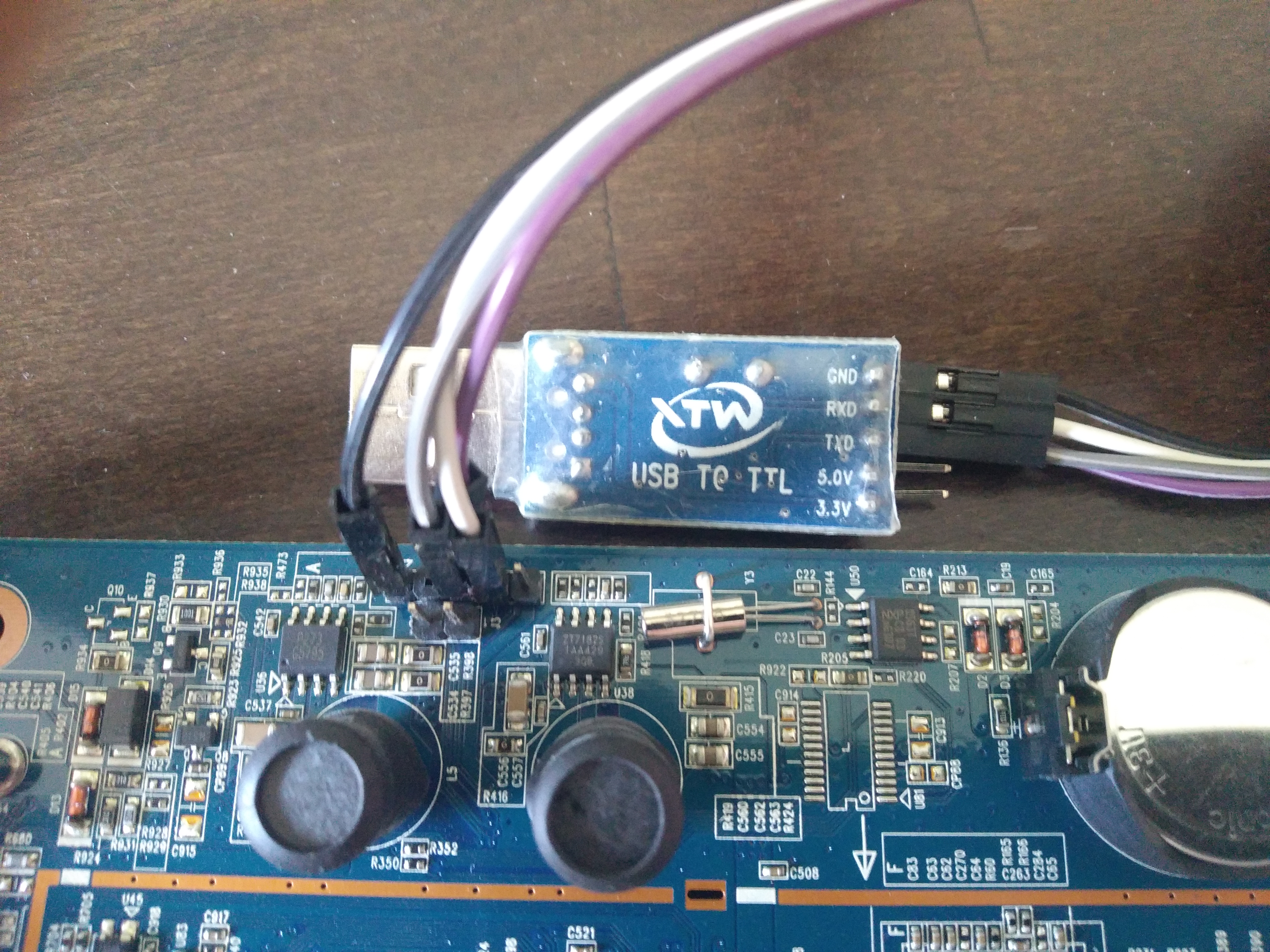
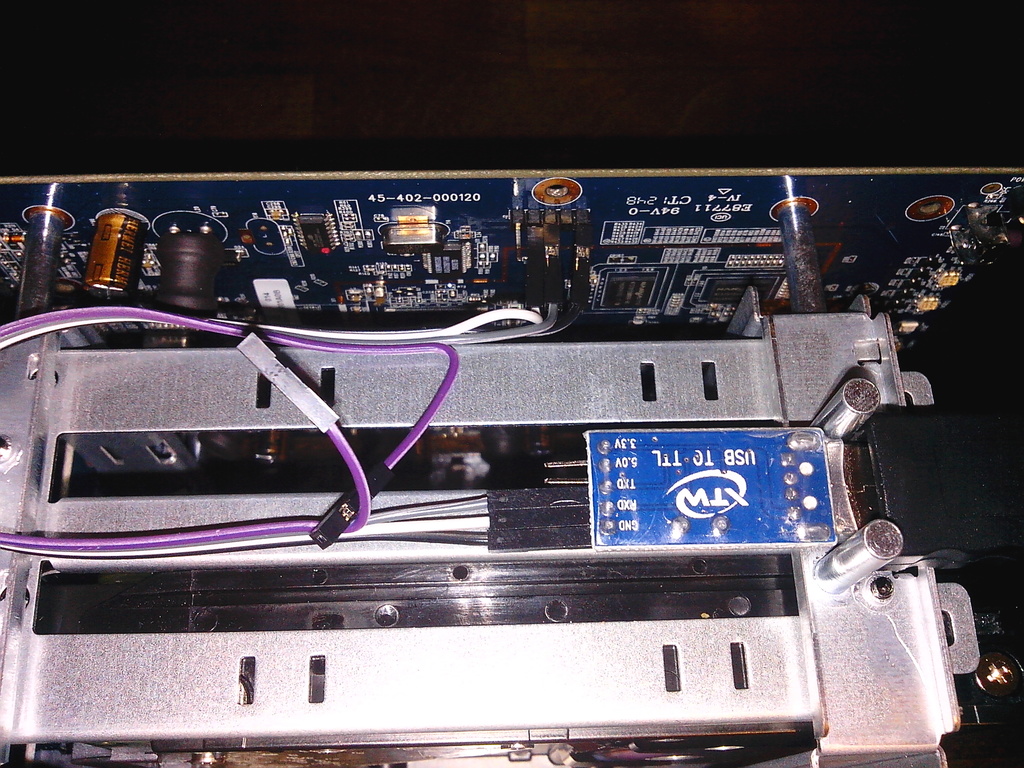
USB TTL to NSA-320
NSA325: http://dl.panticz.de/zyxell/tty_nsa325.jpg
NSA320: http://dl.panticz.de/hardware/zyxel_nsa320/nsa320_usb_ttl.jpg
install ssh
wget ftp://ftp.zyxel-tech.de/2.new_mirror/NSA310/4.40/zypkg/web_prefix -O /i-data/d154583a/admin/zy-pkgs/web_prefix
# firmware / package / reload
# install ffp
/i-data/d154583a/admin/zy-pkgs/ffp/ffp.log

ZyXEL NSA320
https://forum.doozan.com/read.php?2,88619

Update uboot
http://forum.doozan.com/file.php?3,file=160,filename=kwboot-tool.tar.gz,download=1
download: https://bitly.com/1W6D2pd

dhcp
tftpboot 0x800000 uboot.2017.07-tld-1.nsa325.mtd0.kwb
nand erase 0x0 0x80000
nand write.e 0x800000 0x0 0x80000
reset

Create USB boot disk
download: https://bitly.com/3zCSrnC

DEVICE=/dev/sdc

sudo umount ${DEVICE}*
sudo parted ${DEVICE} -s rm 1
sudo parted ${DEVICE} -s mklabel msdos
sudo parted ${DEVICE} -s mkpart primary ext3 0% 100%
sudo mkfs.ext3 ${DEVICE}1 -F -L rootfs
sudo mount ${DEVICE}1 /mnt
sudo tar xjf Debian-5.13.6-kirkwood-tld-1-rootfs-bodhi.tar.bz2 -C /mnt/
sync
sudo umount ${DEVICE}1

Boot from NAND (optinal)
https://forum.doozan.com/read.php?2,12096
download: https://bitly.com/3zCSrnC

Install

Automatic installation scripts for Ubuntu / Linux
https://louwrentius.com/understanding-the-ubuntu-2004-lts-server-autoinstaller.html
https://github.com/panticz/installit

Manual install

URL=http://ftp.us.debian.org/debian/pool/main/t/terminator/terminator_2.1.3-1~bpo12+2_all.deb
wget ${URL} -P /tmp
sudo dpkg -i /tmp/terminator_*_all.deb

Run late_command script manually

wget -q --no-check-certificate https://raw.githubusercontent.com/panticz/preseed/master/late_command.sh -O - | sudo bash -s #00:11:22:33:44:55

Create pressed autoinstall CD

wget -q https://raw.githubusercontent.com/panticz/preseed/master/pxe/scripts/create.netinstall.ubuntu.cd.sh -O - | bash -

Post install second OS over KVM

sudo kvm -m 512 -hda /dev/sda -net nic,macaddr=$(LANG=en; ifconfig eth0 | grep "HWaddr" | tr -s " " | cut -d" " -f5) -net user -smp 2

Install default applications

# todo
# /tmp/debconf-answer.txt
# accept java licence
# sun-java6-bin shared/accepted-sun-dlj-v1-1    boolean true
apt-get -y install thunderbird vlc sun-java6-jre smbfs sun-java6-plugin bluefish putty tofrodos imagemagick p7zip-full smartmontools hwinfo lshw nfs-common rtorrent k9copy

gtk-recordmydesktop - Screencast creation for linux
unetbootin - create USB boot pen wirh different distributions

Packages

searchmonkey - powerful text searches on Linux using regular expressions
dosfstools - Utilities to create and check MS-DOS FAT filesystems
apt-get install gnome-do gnome-do-plugins
tofrodos - Converts DOS <-> Unix text files, alias tofromdos (dosfstools)
radiotray - Radio Tray is a simple streaming music player
apt-get install cclive - command line media download tool with low footprint (download YouTube videos)

Fonts

sudo apt-get install msttcorefonts
sudo apt-get install ttf-ubuntu-title
Ubuntu font directory:
/usr/share/fonts/truetype

Fix Java plugin in Hardy (only i386)

apt-get remove icedtea-gcjwebplugin
apt-get install -y sun-java6-plugin

Netboot install from harddisk

install linux
Profiles GitHub StackOverflow LinkedIn Xing
Contact Imprint
© panticz 2026

Cookie-Einstellungen

Diese Website nutzt eingebettete Inhalte von Drittanbietern (z.B. YouTube, SoundCloud). Beim Laden dieser Inhalte werden Daten an die jeweiligen Anbieter übermittelt. Datenverarbeitungserklärung